Integrate BigBlueButton with Canvas LMS by Instructure
Integrate BigBlueButton with Canvas LMS
If you are using Paid Canvas LMS by Instructure, it already comes with a free-tier BigBlueButton integration provided by Blindside Networks.
The Free Tier Service Comes with a Few Limitations
- Each session can only last up to 60 minutes.
- A maximum of 25 concurrent users per session.
- Recordings expire after seven days and cannot be downloaded.
- Student webcams are only visible to the moderator.
To overcome these limitations and unlock the full potential of your virtual classroom, you need to provide your own BigBlueButton infrastructure API credentials — or request your Canvas CSM to upgrade to the Premium BigBlueButton Tier provided by Blindside Networks (which is costly and less flexible compared to self-hosted or our managed hosting).
Instructure Team Contact Info
If your organisation has a Canvas Paid Subscription, your Admin already has the Customer Success Manager (CSM) contact info.
At BigBlueButton.Host, we offer self-hosted-like flexibility with fully managed hosting plans for BigBlueButton.
Or we can help deploy your own self-hosted BigBlueButton infrastructure on your dedicated or cloud infrastructure like AWS, Microsoft Azure, or Google Cloud.
You can email your Customer Success Manager (CSM) at Instructure to make the necessary changes on your Paid Canvas account to use the API credentials of BigBlueButton infrastructure provided by you. You need to obtain the BigBlueButton API credentials before contacting the Instructure team.
For Self-Hosted Canvas Sites
BigBlueButton also integrates seamlessly with self-hosted Canvas LMS, enabling you to conduct conferences directly within Canvas.
1. Obtain API Credentials
You will need the BigBlueButton API URL and Secret, which should look like this:
- URL:
https://bbb.yourdomain.com/bigbluebutton/ - SECRET:
mqZgKaue7g3Lg0jA32Pi1TEpRzusK7P19wIKqJ0n
If you want to test the integration before subscribing to a hosting plan, you may request TEST API credentials for development and testing.
2. Integration Steps

- Go to
Admin -> Pluginsin your Canvas site. - Click the gear icon for BigBlueButton.
- In the plugin settings, uncheck "Disable this Plugin".
- Enter the Domain (the hostname of your BigBlueButton URL, e.g.
bbb.yourdomain.com) and the Secret.
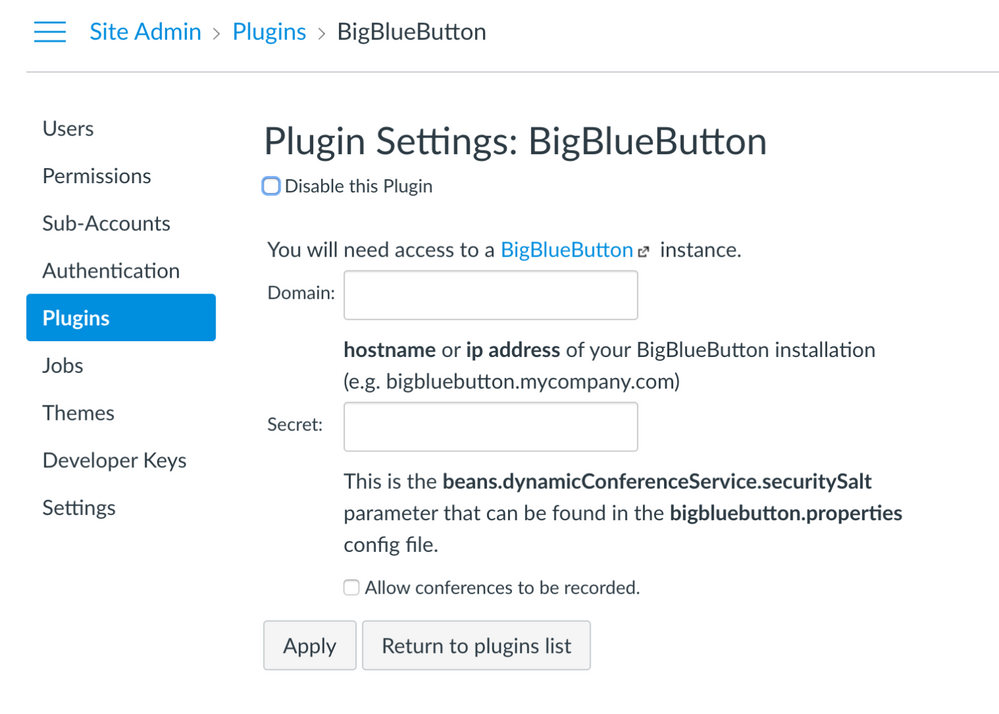
Save the changes. BigBlueButton will now be available as a conferencing tool inside your Canvas courses.
About BigBlueButton Host
Thanks for reading this post on Integrate BigBlueButton with Canvas LMS by Instructure. At BigBlueButton Host, we help teams, schools, and training organizations run dependable BigBlueButton infrastructure with practical guidance, clear deployment paths, and real-world operational support.
Related Articles
Deploy BigBlueButton Today
Get your own fully managed BigBlueButton server up and running in minutes. No technical expertise required.